
5G Non-Standalone, or 5G NR NSA, remains one of the most important deployment and testing architectures for operators, device manufacturers, IoT vendors, and private network teams. In NSA mode, the device does not connect directly to a 5G core. Instead, it uses LTE as the anchor layer while adding NR as a secondary radio layer for additional throughput and capacity.
For engineering teams, NSA testing is about proving that a device can correctly attach to LTE, report its NR capability, receive the correct measurement configuration, detect the NR cell, and complete the secondary cell group addition procedure.
The Pico5G, Nutaq’s world-leading 4G/5G network emulation platform, allows this complete workflow to be reproduced in a controlled lab environment before field deployment. By integrating Amarisoft’s proven cellular stack software with Nutaq’s system-level expertise and product packaging, the Pico5G gives teams a practical way to validate LTE, 5G NSA, and 5G SA device behavior using repeatable network configurations.
Why 5G NR NSA Still Matters
Although 5G Standalone receives more attention today, NSA remains highly relevant in real-world networks and in device validation. Many commercial 5G deployments were introduced using NSA because it allowed operators to reuse existing LTE EPC infrastructure while adding NR radio capacity.
This makes NSA testing especially important when validating devices that must work across mixed LTE and 5G environments.
For engineering teams, NSA testing helps answer practical questions:
- Can the device attach to the LTE anchor cell correctly?
- Does the UE report the correct EN-DC and NR band support?
- Does the network send the expected NR measurement configuration?
- Does the UE detect the NR cell and send a valid measurement report?
- Does the RRC reconfiguration successfully add the NR secondary cell?
- Can traffic flow over the NSA connection under realistic RF and bandwidth conditions?
These are not theoretical checks. They are the issues that often determine whether a UE performs correctly in a real operator network, private cellular network, or industrial deployment.
What Is Being Tested in a Pico5G NSA Lab Setup?
A typical NSA test environment includes three key elements: a UE, an LTE anchor cell, and an NR secondary cell. In a Pico5G setup, the system emulates the LTE eNodeB, the NR gNodeB, and the required core network functions needed to reproduce the NSA workflow in the lab.
The simplest NSA test case uses:
Test element |
Role in NSA testing |
| LTE cell | Anchor cell for attach, mobility, and control signaling |
| NR cell | Secondary cell for additional data capacity |
| UE | Device under test |
| EPC/MME | Core network control plane for LTE-anchored NSA |
| Test SIM | Allows the UE to authenticate with the lab network |
| Traffic source | Used to verify throughput and user-plane operation |
| Pico5G | Network emulation platform used to reproduce the LTE/NR environment |
In the basic NSA test, the LTE cell is established first. Once the UE attaches, the Pico5G checks the UE capability information. If the device supports the required EN-DC band combination, the network configures NR measurement reporting. The UE then measures the NR cell, sends a measurement report, and receives an RRC reconfiguration message that adds the NR secondary cell.

Figure 1. In 5G NR NSA testing, the UE first attaches to the LTE anchor cell. The NR cell is then added as a secondary cell to increase user-plane capacity.
The NSA Attach and NR Addition Flow
A useful way to understand NSA testing is to break the process into a repeatable validation sequence.
1. LTE Attach
The UE first attaches to the LTE anchor cell. This confirms that the basic RF setup, SIM profile, PLMN, TAC, EPC/MME, and LTE cell parameters are correct.
2. UE Capability Exchange
After LTE attach, the network evaluates whether the UE supports NR NSA operation. The most important information is whether the UE supports EN-DC and whether it supports the LTE-NR band combination configured in the test environment.
3. NR Measurement Configuration
If the UE capability information is suitable, the Pico5G configures the UE to measure the NR cell. If the measurement configuration for NR is missing, it often means the UE did not report support for the required NR capability or LTE-NR band combination.
4. UE Measurement Report
The UE must detect the NR cell and report the configured measurement event. If this report is not sent, the network will not proceed with NR addition.
5. RRC reconfiguration for NR addition
Once the measurement report is received, the LTE anchor sends an RRCConnectionReconfiguration message to add the NR cell as the secondary cell group. This message contains the NR configuration required by the UE.
6. NR RACH Procedure
After processing the reconfiguration, the UE performs random access on the NR cell. If the RACH procedure fails, NSA setup does not complete.
7. User-Plane Traffic Validation
Once NSA is established, IP traffic can be generated to verify real data transfer and throughput behavior. This can be done using common traffic tools, application traffic, or browser-based speed testing, depending on the purpose of the validation.
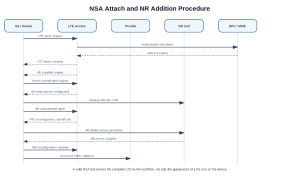
Figure 2. A successful NSA test requires more than LTE attach. The UE must report EN-DC capability, measure the NR cell, complete RRC reconfiguration, and finish the NR random access procedure.
Key Configuration Areas for 5G NSA Testing with Pico5G
A 5G NSA lab test is only as good as the configuration behind it. The main configuration areas include LTE cell settings, NR cell settings, measurement configuration, UE capability support, RF port mapping, and band combination alignment.
LTE Anchor Configuration
The LTE cell acts as the Master Cell Group. Engineers should verify:
- RAT type
- LTE band
- EARFCN
- Bandwidth
- PCI
- TAC
- PLMN
- Downlink and uplink gain
- RF port mapping
- Antenna configuration
- Carrier aggregation configuration, if used
In a Pico5G workflow, engineers can confirm physical-layer and cell-level parameters before continuing with the NSA test. Common items to verify include RAT, band, bandwidth, ARFCN, subcarrier spacing, and RF port mapping.
NR Secondary Cell Configuration
The NR cell acts as the Secondary Cell Group. Engineers should verify:
- NR band
- NR ARFCN
- Bandwidth
- Subcarrier spacing
- SSB configuration
- TDD UL/DL pattern, if applicable
- SSB power
- NR antenna configuration
- RF port mapping
For many NSA tests, the NR cell is configured as a TDD cell in a common 5G band such as n78. The same principles apply when testing other FR1 bands, provided the UE supports the selected LTE-NR combination.
EN-DC and Measurement Configuration
The measurement configuration is central to NSA establishment. Without the correct NR measurement object and reporting configuration, the UE may attach to LTE but never add NR.
- NR measurement event configuration
- NR RSRP threshold
- Hysteresis
- Time-to-trigger
- Measurement gaps, where required
- NR measurement object
- Measurement ID mapping
- Report configuration mapping
The key point is simple: LTE attach alone does not prove NSA success. The Pico5G must configure NR measurement, the UE must report the NR cell, and the network must proceed with NR addition.
Common 5G NSA Test Scenarios with Pico5G
Test Scenario 1: Basic NSA – One LTE Cell + One NR Cell
This is the best starting point for NSA validation. It confirms the basic UE and network emulator workflow without the complexity of carrier aggregation.
- Basic LTE attach
- EN-DC capability reporting
- NR measurement configuration
- NR secondary cell addition
- Initial data throughput
- Basic RRC/NAS signaling behavior
This is usually the first test to run when evaluating a new UE, a new test SIM, or a new band combination.
Test Scenario 2: LTE Carrier Aggregation + NR
A more advanced test uses multiple LTE component carriers plus one NR secondary cell. This type of test validates more complex CA and NSA behavior.
- LTE carrier aggregation capability
- EN-DC behavior with multiple LTE carriers
- UE capability reporting for CA and NSA combinations
- Throughput scaling
- Scheduler and RF resource behavior
- Complex operator-like configurations
This type of test is useful for smartphones, high-performance modules, routers, and industrial gateways that are expected to operate in advanced LTE/5G networks.
Test Scenario 3: Mixed FDD/TDD LTE CA + NR
A mixed FDD/TDD LTE configuration adds another layer of realism. Some networks combine FDD LTE anchor capacity with TDD LTE or TDD NR layers.
- Mixed duplexing behavior
- FDD/TDD LTE carrier aggregation
- NSA operation with complex timing and RF conditions
- UE behavior in operator-like band plans
- Advanced RRC and measurement configuration
This is especially useful for teams preparing devices for multi-band operator acceptance, private network validation, or field trials.
What to Look for in the Logs
Log analysis is where NSA testing becomes truly valuable. A device may show “5G” in the UI, but engineering validation requires proof at the signaling level.
- LTE attach completion
- UE capability enquiry
- UE capability information
- EN-DC support indication
- Supported NR band list
- Supported LTE-NR band combination list
- NR measurement configuration
- UE measurement report
- RRCConnectionReconfiguration for NR addition
- RRCConnectionReconfigurationComplete
- NR RACH procedure
- SCG addition success or failure
- User-plane traffic over the established connection
After LTE attach, the Pico5G should send NR measurement report configuration when the UE supports the configured NSA combination. If this message is missing, the likely root cause is UE capability mismatch, unsupported band combination, or configuration mismatch.
For NR addition, the UE capability information must include the NR band and the LTE-NR band combination configured in the Pico5G. If the configured NR band or EN-DC combination is not present in the UE capability information, the system may not proceed with NR measurement configuration or secondary cell addition.
Troubleshooting: Why NSA Setup Fails
NSA failures often occur after LTE attach succeeds. This can be confusing because the device appears connected, but NR is not added. The most common causes are usually related to capability mismatch, measurement configuration, RF conditions, or RRC procedure failure.
1. UE Does Not Support the Configured LTE-NR Band Combination
This is one of the most common NSA issues. The UE may support LTE. It may support NR. It may even support NSA. But it may not support the exact LTE anchor band and NR secondary band combination configured in the lab.
2. NR Measurement Configuration is Missing
If the network does not send the correct NR measurement configuration, the UE will not report the NR cell. This often points back to UE capability reporting or unsupported EN-DC combinations.
3. UE Does Not Send the NR Measurement Report
If the UE receives the measurement configuration but does not send a report, check RF power, SSB configuration, NR frequency, measurement threshold, and whether the UE can actually detect the NR cell.
4. RRC Reconfiguration Fails
If the UE receives the RRC reconfiguration but fails to complete it, inspect the NR secondary cell group configuration, RACH configuration, timing, RF conditions, and UE logs.
5. NR RACH Fails
If the UE attempts NR random access but does not complete it, the issue may be related to RF level, uplink path, timing, TDD configuration, or PRACH configuration.
6. SCG Failure After NR Addition
If NR is added but then fails, analyze the SCG failure cause and correlate it with RF measurements, MAC/RLC behavior, and UE-side logs.
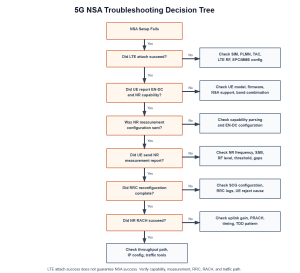
Figure 3. NSA troubleshooting decision tree. LTE attach success does not guarantee NSA success; engineers must verify UE capability, NR measurement, RRC reconfiguration, and NR random access.
Why Pico5G Matters for 5G NSA Validation
Field testing is expensive, slow, and difficult to control. The Pico5G allows engineering teams to reproduce NSA conditions repeatedly and isolate problems before deployment.
- Validate UE compatibility before field trials
- Confirm LTE-NR band combinations
- Reproduce operator-like network configurations
- Debug attach and RRC signaling issues
- Test throughput under controlled RF conditions
- Compare firmware versions
- Validate modules, gateways, routers, and smartphones
- Prepare for private LTE/5G deployment
- Reduce dependency on live network availability
For IoT and industrial device vendors, this is particularly important. A device that works on one operator network may fail on another because of band combinations, measurement thresholds, SIM profiles, carrier aggregation behavior, or network configuration differences.
The Pico5G: An Amarisoft-Based 4G/5G Network Emulation Platform
The Pico5G combines Nutaq’s product integration, RF system experience, and cellular testing expertise with Amarisoft’s mature LTE and 5G stack software. The result is a practical test platform for teams that need to validate commercial UEs, IoT modules, gateways, routers, and private network devices in a controlled lab environment.
The Pico5G can support testing across key 4G and 5G workflows, including:
- LTE attach and throughput testing
- 5G NR NSA validation
- 5G SA validation
- UE capability analysis
- SIM and PLMN testing
- RRC and NAS troubleshooting
- IoT module validation
- Private network readiness testing
- Operator-like network emulation
For NSA testing, the Pico5G helps validate:
- LTE anchor attach
- NR secondary cell addition
- UE capability reporting
- EN-DC band combination support
- SIM and PLMN behavior
- RRC/NAS signaling
- Throughput and traffic behavior
- Operator-like or private-network-like configurations
This makes the Pico5G useful for device manufacturers, utilities, telecom integrators, private network teams, and industrial IoT vendors who need to understand how their devices behave before deployment.
Practical Checklist for 5G NR NSA Validation
Before running an NSA test with the Pico5G, confirm the following:
- The test SIM is correctly provisioned
- The UE supports NSA mode
- The UE supports the selected LTE band
- The UE supports the selected NR band
- The UE supports the exact LTE-NR EN-DC band combination
- The LTE anchor cell is broadcasting correctly
- The NR cell is configured on the expected band and ARFCN
- The measurement configuration includes the NR cell
- The RF path and gain levels are appropriate
- The UE receives NR measurement configuration
- The UE sends the NR measurement report
- The network sends RRC reconfiguration for NR addition
- The UE completes RRC reconfiguration
- The NR RACH procedure completes successfully
- User-plane traffic flows after NSA establishment
This checklist is often the fastest way to separate a basic RF/setup issue from a deeper UE capability or signalling issue.
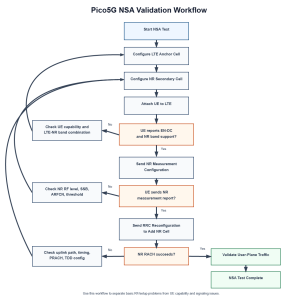
Figure 4. A practical 5G NSA validation workflow with Pico5G. Most NSA failures can be traced to UE capability mismatch, missing NR measurement reports, RF configuration issues, or NR RACH failure.
Conclusion: 5G NSA Testing Is About More Than Seeing a 5G Icon
A successful 5G NSA test is not simply about whether a device displays a 5G indicator. True validation requires confirming the full LTE-to-NR workflow: LTE attach, UE capability exchange, NR measurement configuration, measurement reporting, RRC reconfiguration, NR random access, and user-plane traffic.
With the Pico5G, engineering teams can reproduce these procedures in a controlled lab environment using an Amarisoft-based cellular stack integrated into a practical 4G/5G test platform. This makes it easier to debug device behavior, validate band combinations, compare firmware versions, and reduce the risk of issues appearing later in the field.
Whether you are validating a 5G module, preparing an industrial gateway, testing operator-specific configurations, or de-risking a private LTE/5G deployment, NR NSA testing remains a critical part of the 5G validation workflow.
Need to Validate 5G NSA, LTE, or Private Network Device Behavior?
Nutaq helps device manufacturers, system integrators, utilities, and industrial operators test cellular devices in a controlled lab environment before field deployment. With the Pico5G, teams can emulate LTE and 5G network conditions, validate UE behavior, troubleshoot signalling issues, and reduce deployment risk.
Contact Nutaq to discuss your 4G/5G testing requirements or request a Pico5G demo.